Skip to Content

One‑Step, Two‑Step, and Three‑Step Manufacturing in Odoo Explained  

One‑Step, Two‑Step, and Three‑Step Manufacturing in Odoo Explained  

In modern manufacturing software like Odoo, understanding how your production process is executed in the system is essential. Odoo gives you three ways to handle manufacturing workflows: one‑step, two‑step, and three‑step manufacturing. Each method represents a different level of detail for how materials are moved and tracked during production. Choosing the right one can improve efficiency, traceability, and accuracy in your operations.

In this article, we’ll walk you through what each approach means, how they differ, and when to use them. These are all based on official Odoo documentation and practical demonstrations.


What “Manufacturing Steps” Mean in Odoo

Before we dive into each type, it’s important to understand that Odoo’s manufacturing process can be configured at the warehouse level. This means each warehouse can use a different manufacturing workflow (one, two, or three steps), depending on your business needs.

The number of steps you use determines how inventory moves and how much detail Odoo tracks:

  • One‑step: Simple and fast, minimal tracking

  • Two‑step: Adds component picking before production

  • Three‑step: Adds finished goods staging after production

This flexibility lets you match the system to your real‑world operations.

One‑Step Manufacturing: Simple and Direct
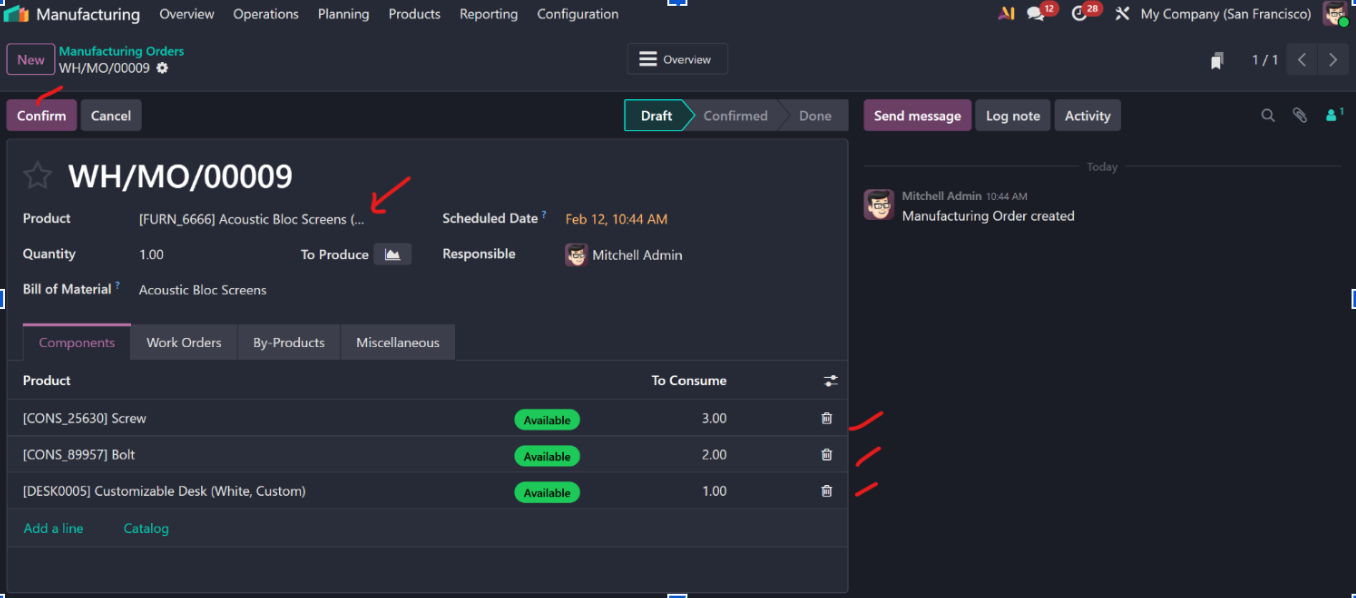
In one‑step manufacturing, Odoo does not create separate transfer orders for moving materials or finished products. Instead:

  • You create a Manufacturing Order (MO)

  • Odoo deducts components from inventory

  • Odoo adds finished goods to inventory once production completes

  • No physical transfer moves are tracked in the system


This method is ideal for:

  • Small workshops

  • Simple assembly tasks

  • Companies that are not tracking detailed warehouse movements

How It Works

  1. Go to Manufacturing → Operations → Manufacturing Orders

  2. Create a new MO and select the product to produce

  3. Odoo auto‑fills the associated Bill of Materials (BoM)

  4. Confirm the MO to start production


Once completed, the system updates inventory counts without showing intermediate transfers.

Pros of One‑Step:

  • Fast setup

  • Easy to manage

  • Less administrative tracking


Cons of One‑Step:

  • No physical transfers recorded

  • Harder to track how inventory physically moves
Two‑Step Manufacturing: Adding Component Pickings

Two‑step manufacturing adds one additional layer: picking components before production.

Here’s what happens:

  1. Odoo creates a pick components transfer (raw materials moved to production area)

  2. A manufacturing order is generated

  3. Finished products are automatically added to inventory once done; no transfer for storing them


Why Use Two‑Step?

This setup is more structured than one‑step and useful when your warehouse team:

  • Needs to see physical movements

  • Picks materials separately from production

  • Tracks who picked what, and when


Inventory is more visible, even if the finished goods aren’t manually staged back into stock.

Pros of Two‑Step:

  • Component movements are tracked

  • Better visibility in warehouse operations


Cons of Two‑Step:

  • Slightly more complex than one‑step

  • Finished product movements are still not recorded

Three‑Step Manufacturing: Full Tracking for Complex Workflows

Three‑step manufacturing offers the most detailed workflow. It tracks three distinct movements:

  1. Pick Components Transfer – raw materials moved to production

  2. Manufacturing Order – assembly or production

  3. Store Finished Products Transfer – finished goods moved to storage


This approach mirrors how many real manufacturing floors operate and gives the most transparency and control.

How It Works

  1. Create and confirm an MO


    • Bill of Materials and operations are loaded based on the product’s setup.


  2. Process the Pick Components Transfer


    • Warehouse workers move the components to production locations and validate the move.


  3. Complete Work Orders


    • Operators perform tasks on the production order or in the Shop Floor app.


  4. Store Finished Products Transfer


    • Once production is done, finished products are moved back into your stock location.


When to Use Three‑Step

Three‑step workflows are perfect for:

  • Medium to large manufacturing operations

  • Firms needing full traceability

  • Businesses where physical handling and staging matter

  • Quality control, inspection, and verification processes

Benefits:

  • Complete visibility of inventory movement

  • Separation of warehouse and production tasks

  • Supports compliance and audit needs

Drawbacks:

  • More complex setup

  • Requires disciplined warehouse processes

Practical Tips for Choosing Between Steps

When deciding which manufacturing workflow to use in Odoo, consider:

Your Business Complexity

  • Simple assembly? One‑step might be enough.

  • Separate warehouse and production teams? Two‑step can help.

  • Strict control and traceability needed? Three‑step is best.

Reporting Needs

If you need to know who moved what and when, two or three steps provide better visibility.

Integration with Shop Floor

Three‑step works hand‑in‑hand with Shop Floor apps, enabling production tracking for individual tasks and work orders — which is essential for quality and performance metrics.

Example: Building Cabinets in Three Steps

Imagine a furniture factory:

  • Step 1: Warehouse picks the right wood, screws, and varnish

  • Step 2: Production team assembles cabinets following operations in the BoM

  • Step 3: Finished cabinets are moved to storage and quality checked


With three‑step, each of these movements is recorded in Odoo, giving real‑time insights into inventory and production status.

Conclusion

Understanding one, two, and three‑step manufacturing workflows in Odoo helps you align your ERP with real‑world operations. Whether you need simplicity or full inventory traceability, Odoo allows you to configure your warehouse and production processes accordingly.

In summary:

  • One‑Step: Fast and minimal tracking

  • Two‑Step: Tracks component pickings

  • Three‑Step: Full inventory movement visibility


Choosing the right workflow ensures better control, improved accuracy, and alignment with your company’s size and manufacturing complexity. 

Learn more