Running a business that serves both retail consumers and wholesale clients requires fundamentally different approaches to pricing, checkout processes, and customer relationship management. Odoo eCommerce recognizes these distinct needs and provides powerful tools to manage B2B and B2C operations, whether on a single platform or through separate websites.
Understanding how to configure customer accounts, pricelists, and access controls allows you to serve both market details effectively while maintaining operational efficiency and protecting sensitive pricing information.
Running a business that serves both retail consumers and wholesale clients requires fundamentally different approaches to pricing, checkout processes, and customer relationship management. Odoo eCommerce recognizes these distinct needs and provides powerful tools to manage B2B and B2C operations, whether on a single platform or through separate websites.
Understanding how to configure customer accounts, pricelists, and access controls allows you to serve both market details effectively while maintaining operational efficiency and protecting sensitive pricing information.
Understanding B2B and B2C Business Models

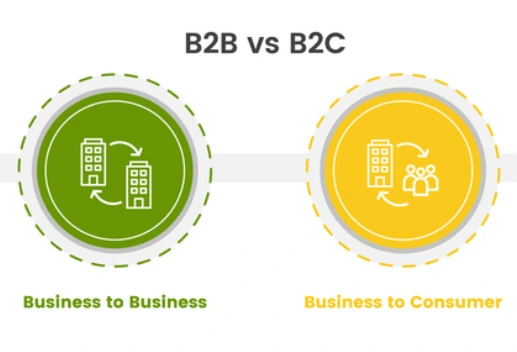
B2C (Business-to-Consumer) processes typically involve selling products directly to end users at retail prices that include taxes. The shopping experience emphasizes browsing, quick purchases, and minimal conflict. Customers want to see prices immediately, add items to their cart, and check out quickly, often as guests without creating accounts.
B2B (Business-to-Business) transactions operate differently. Wholesale customers usually get discounts when they buy in large amounts. They can also agree on special prices, and they prefer to see prices without tax because they often don’t pay tax or calculate it separately. B2B buyers frequently need to reference purchase orders, require detailed invoices, and expect account representatives who understand their specific needs. Some B2B companies even prefer hiding prices entirely until customers receive approval and account access.
These differences require different configurations. A one-size-fits-all approach frustrates both customer types; retail shoppers don't want required account creation, while wholesale buyers need the personalized pricing and documentation that comes with account management.
Understanding B2B and B2C Business Models
B2C (Business-to-Consumer) processes typically involve selling products directly to end users at retail prices that include taxes. The shopping experience emphasizes browsing, quick purchases, and minimal conflict. Customers want to see prices immediately, add items to their cart, and check out quickly, often as guests without creating accounts.
B2B (Business-to-Business) transactions operate differently. Wholesale customers usually get discounts when they buy in large amounts. They can also agree on special prices, and they prefer to see prices without tax because they often don’t pay tax or calculate it separately. B2B buyers frequently need to reference purchase orders, require detailed invoices, and expect account representatives who understand their specific needs. Some B2B companies even prefer hiding prices entirely until customers receive approval and account access.
These differences require different configurations. A one-size-fits-all approach frustrates both customer types; retail shoppers don't want required account creation, while wholesale buyers need the personalized pricing and documentation that comes with account management.
Configuring Pricelists for Different Customer Types
For B2C customers, create a standard retail price list with tax-included prices. This pricelist becomes your default assigned to the Public User. The special contact represents all non-logged-in website visitors. Set your products at retail prices in this list, ensuring customers see final costs including all applicable taxes.
B2B pricelists need more detailed pricing rules. Create wholesale price lists with tax-excluded prices that typically offer 10-40% discounts from retail, depending on your margin structure. You can create multiple B2B pricelists for different customer tiers, perhaps "Standard Wholesale" for new accounts, "Preferred Partner" for established clients, and "Platinum" for your highest-volume customers. Each tier can have progressively better pricing to reward loyalty and volume purchases.
Pricelists form the foundation of managing different customer types in Odoo. Navigate to Sales > Configuration > Pricelists to access the pricelist management interface. Create separate pricelists for your B2B and B2C customers that reflect their different pricing structures

The power of Odoo's pricelist system lies in its flexibility. Beyond simple percentage discounts, you can set specific prices for individual products, set prices based on how many items a customer buys, or apply time-based promotions. These refined rules apply automatically based on which pricelist is assigned to each customer.
Configuring Pricelists for Different Customer Types
Pricelists form the foundation of managing different customer types in Odoo. Navigate to Sales > Configuration > Pricelists to access the pricelist management interface. Create separate pricelists for your B2B and B2C customers that reflect their different pricing structures
For B2C customers, create a standard retail price list with tax-included prices. This pricelist becomes your default assigned to the Public User. The special contact represents all non-logged-in website visitors. Set your products at retail prices in this list, ensuring customers see final costs including all applicable taxes.
B2B pricelists need more detailed pricing rules. Create wholesale price lists with tax-excluded prices that typically offer 10-40% discounts from retail, depending on your margin structure. You can create multiple B2B pricelists for different customer tiers, perhaps "Standard Wholesale" for new accounts, "Preferred Partner" for established clients, and "Platinum" for your highest-volume customers. Each tier can have progressively better pricing to reward loyalty and volume purchases.
The power of Odoo's pricelist system lies in its flexibility. Beyond simple percentage discounts, you can set specific prices for individual products, set prices based on how many items a customer buys, or apply time-based promotions. These refined rules apply automatically based on which pricelist is assigned to each customer.
Managing Customer Accounts and Portal Access
Customer accounts serve different purposes for B2B and B2C operations. For retail customers, accounts provide convenience such as saved addresses, order history, and wishlist functionality. For wholesale customers, accounts are essential for accessing custom pricing and managing their relationship with your business.
Configure account requirements through Website > Configuration > Settings in the eCommerce section. The "Sign in/up at checkout" setting offers three options that align with different business models:
Optional sign-in works well for B2C operations where you want to encourage account creation without forcing it. Customers can check out as guests but receive an email afterward offering to create an account for tracking their order and future purchases.
Disabled sign-in allows pure guest checkout, minimizing conflict for one-time retail purchases. This maximizes conversion rates but sacrifices the marketing benefits of having customer contact information and purchase history.
Mandatory sign-in requires account creation before checkout, which suits B2B operations perfectly. Combined with invitation-only account creation (configured in the Customer Account section of general settings), this ensures only approved wholesale customers can make purchases.
Managing Customer Accounts and Portal Access
Customer accounts serve different purposes for B2B and B2C operations. For retail customers, accounts provide convenience such as saved addresses, order history, and wishlist functionality. For wholesale customers, accounts are essential for accessing custom pricing and managing their relationship with your business.
Configure account requirements through Website > Configuration > Settings in the eCommerce section. The "Sign in/up at checkout" setting offers three options that align with different business models:
Optional sign-in works well for B2C operations where you want to encourage account creation without forcing it. Customers can check out as guests but receive an email afterward offering to create an account for tracking their order and future purchases.
Disabled sign-in allows pure guest checkout, minimizing conflict for one-time retail purchases. This maximizes conversion rates but sacrifices the marketing benefits of having customer contact information and purchase history.
Mandatory sign-in requires account creation before checkout, which suits B2B operations perfectly. Combined with invitation-only account creation (configured in the Customer Account section of general settings), this ensures only approved wholesale customers can make purchases.
Hiding Prices for B2B-Only Websites

Next, enable "Prevent Sale of Zero Priced Product" in Website > Configuration > Settings under eCommerce. This prevents the "Add to Cart" button from appearing on products with zero prices. When visitors click where the price should be, you can redirect them to a contact form by specifying a Button URL.
For approved B2B customers, navigate to Website > eCommerce > Customers, select the customer, and grant portal access through the Actions menu. Assign their specific wholesale pricelist in their contact form's Sales & Purchase tab. When they log in, they'll see their custom pricing while the general public sees only product information without prices or purchase buttons.
Many B2B businesses prefer showcasing products without displaying prices to unapproved visitors. This strategy serves multiple purposes: it protects competitive pricing information, encourages direct contact with sales representatives, and creates an exclusive feel that matches the relationship-based nature of wholesale business.
Implementing price hiding requires several coordinated steps. First, create a zero-price pricelist where all products have $0.00 prices. Navigate to Website > eCommerce > Customers, filter to show archived contacts, and locate the Public User. In the Sales & Purchase tab, assign this zero-price pricelist. The Public User must remain archived, never activate this contact.
Hiding Prices for B2B-Only Websites
Many B2B businesses prefer showcasing products without displaying prices to unapproved visitors. This strategy serves multiple purposes: it protects competitive pricing information, encourages direct contact with sales representatives, and creates an exclusive feel that matches the relationship-based nature of wholesale business.
Implementing price hiding requires several coordinated steps. First, create a zero-price pricelist where all products have $0.00 prices. Navigate to Website > eCommerce > Customers, filter to show archived contacts, and locate the Public User. In the Sales & Purchase tab, assign this zero-price pricelist. The Public User must remain archived, never activate this contact.
Next, enable "Prevent Sale of Zero Priced Product" in Website > Configuration > Settings under eCommerce. This prevents the "Add to Cart" button from appearing on products with zero prices. When visitors click where the price should be, you can redirect them to a contact form by specifying a Button URL.
For approved B2B customers, navigate to Website > eCommerce > Customers, select the customer, and grant portal access through the Actions menu. Assign their specific wholesale pricelist in their contact form's Sales & Purchase tab. When they log in, they'll see their custom pricing while the general public sees only product information without prices or purchase buttons.
Tax-Included vs Tax-Excluded Pricing
This setup makes pricing clearer for different types of customers. Regular customers (B2C) usually expect to see the final price with tax included, while business customers (B2B) often prefer prices without tax because they handle tax separately. By separating these settings, the system becomes more organized, reduces confusion, and improves the overall buying experience.
In your product catalog, store prices are tax-excluded as the base amount. Create two tax rates with the same percentage but different "Price Include" settings, one marked as included, one excluded. The B2C fiscal position translates the excluded tax to the included version, while B2B customers see the base tax-excluded price. This approach maintains a one consistent pricing reference for product pricing while presenting it appropriately to each customer type.
Tax display represents another critical difference between B2B and B2C operations. Retail consumers expect to see final prices including all taxes, such as what they see is what they pay. Wholesale buyers, particularly in regions with VAT or sales tax, typically work with tax-excluded prices and receive detailed tax breakdowns on their invoices.
Configure how taxes are shown using fiscal positions, which connect standard taxes to either tax-included or tax-excluded versions. Create two fiscal positions: one for B2C that shows prices with tax included, and another for B2B that shows prices without tax. Each fiscal position changes the product’s base tax to the correct display format.

Tax-Included vs Tax-Excluded Pricing
Tax display represents another critical difference between B2B and B2C operations. Retail consumers expect to see final prices including all taxes, such as what they see is what they pay. Wholesale buyers, particularly in regions with VAT or sales tax, typically work with tax-excluded prices and receive detailed tax breakdowns on their invoices.
Configure how taxes are shown using fiscal positions, which connect standard taxes to either tax-included or tax-excluded versions. Create two fiscal positions: one for B2C that shows prices with tax included, and another for B2B that shows prices without tax. Each fiscal position changes the product’s base tax to the correct display format.
This setup makes pricing clearer for different types of customers. Regular customers (B2C) usually expect to see the final price with tax included, while business customers (B2B) often prefer prices without tax because they handle tax separately. By separating these settings, the system becomes more organized, reduces confusion, and improves the overall buying experience.
In your product catalog, store prices are tax-excluded as the base amount. Create two tax rates with the same percentage but different "Price Include" settings, one marked as included, one excluded. The B2C fiscal position translates the excluded tax to the included version, while B2B customers see the base tax-excluded price. This approach maintains a one consistent pricing reference for product pricing while presenting it appropriately to each customer type.
Showing B2B-Specific Checkout Fields
For businesses running both B2B and B2C on separate websites, you can enable these fields on the wholesale site while leaving them disabled on the retail site. This customization ensures each customer type encounters only the information fields relevant to their purchase type.
B2B transactions often require additional information that retail purchases don't need. Company names, VAT numbers, purchase order references, and specific delivery instructions matter for wholesale orders but mess up the checkout for individual consumers.
Odoo allows you to toggle B2B-specific fields on and off through the website editor. On your checkout page, enter edit mode and navigate to the Style tab. You'll find a "Show B2B Fields" toggle that reveals or hides fields like Company Name and VAT Number during the delivery step.
Showing B2B-Specific Checkout Fields
B2B transactions often require additional information that retail purchases don't need. Company names, VAT numbers, purchase order references, and specific delivery instructions matter for wholesale orders but mess up the checkout for individual consumers.
Odoo allows you to toggle B2B-specific fields on and off through the website editor. On your checkout page, enter edit mode and navigate to the Style tab. You'll find a "Show B2B Fields" toggle that reveals or hides fields like Company Name and VAT Number during the delivery step.
For businesses running both B2B and B2C on separate websites, you can enable these fields on the wholesale site while leaving them disabled on the retail site. This customization ensures each customer type encounters only the information fields relevant to their purchase type.
Single Website vs Dual Website Strategy
Businesses that sell to both regular customers (B2C) and other businesses (B2B) need to decide: use one website for both, or make separate websites for each. Odoo lets you do either with its multi-website feature.
Using a single website makes management easier, with one product catalog, one design, and one set of content. You can separate customer types using pricelists, tax settings, and account rules. This works well if your B2B and B2C products are similar and you’re okay with handling different experiences on the same site.
Using dual websites keeps things more organized. Make one site for retail customers with public browsing, guest checkout, prices that include tax, and content for consumers. Make a second site for wholesale with invite-only access, required login, prices without tax, and bulk-order features. Each site can have its own branding, domain, and user experience for its audience. Odoo recommends this approach for businesses handling both B2B and B2C because it avoids the compromises of a single website.
Single Website vs Dual Website Strategy
Businesses that sell to both regular customers (B2C) and other businesses (B2B) need to decide: use one website for both, or make separate websites for each. Odoo lets you do either with its multi-website feature.
Using a single website makes management easier, with one product catalog, one design, and one set of content. You can separate customer types using pricelists, tax settings, and account rules. This works well if your B2B and B2C products are similar and you’re okay with handling different experiences on the same site.
Using dual websites keeps things more organized. Make one site for retail customers with public browsing, guest checkout, prices that include tax, and content for consumers. Make a second site for wholesale with invite-only access, required login, prices without tax, and bulk-order features. Each site can have its own branding, domain, and user experience for its audience. Odoo recommends this approach for businesses handling both B2B and B2C because it avoids the compromises of a single website.
Conclusion
Managing both B2B and B2C customers in Odoo means understanding how pricelists, customer accounts, tax settings, and website options work together to create different experiences. Whether you use one website or separate sites for B2B and B2C, Odoo can handle both effectively. The important thing is to set up your system based on how your customers shop, such as retail buyers want convenience and clear pricing, while wholesale buyers need special pricing and personalized service. Set up your system this way, and both types of customers will have a smooth and tailored experience.

Conclusion
Managing both B2B and B2C customers in Odoo means understanding how pricelists, customer accounts, tax settings, and website options work together to create different experiences. Whether you use one website or separate sites for B2B and B2C, Odoo can handle both effectively. The important thing is to set up your system based on how your customers shop, such as retail buyers want convenience and clear pricing, while wholesale buyers need special pricing and personalized service. Set up your system this way, and both types of customers will have a smooth and tailored experience.