Smarter Inventory Management Starts Here
Streamline your operations, track stock levels in real-time, and eliminate costly ordering mistakes with our intuitive inventory platform.
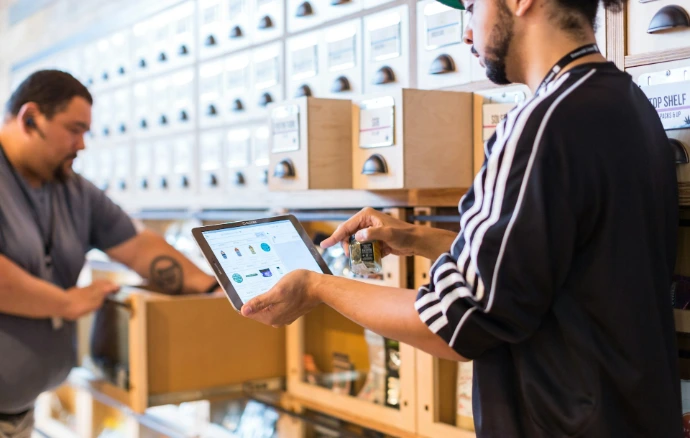
Managing inventory across warehouses, product lines, and supply chains is one of the most complex operational challenges businesses face today. With Odoo Inventory, you gain full visibility and control over every product, movement, and transaction - all in a single, integrated platform.
Whether you are a growing small business or a large enterprise managing multiple warehouses, Odoo Inventory provides the tools you need to reduce stock discrepancies, eliminate manual processes, and make data-driven purchasing decisions.
Why Businesses Choose Odoo Inventory

Real-time tracking of stock levels, movements, and product locations

Seamless integration with Sales, Purchasing, Accounting, and Manufacturing modules

Automated reordering rules to prevent stockouts before they happen

Full lot and serial number traceability for compliance and quality control
Barcode and mobile scanning support for fast, accurate warehouse operations
Ready to transform the way you manage stock?
Let's turn your operational goals into reality. Contact us today to see how our inventory tools can set your business on the path to seamless growth.
Trusted by Thousands of Businesses Worldwide
Odoo is one of the most widely deployed open-source ERP solutions in the world, trusted by organizations in over 100 countries. The Inventory module is designed to scale with your business - from a single stockroom to a global multi-warehouse operation.
Get started today and discover how Odoo Inventory can transform the way your business handles stock management, fulfillment, and supply chain logistics.

Unified Multi-Site Control
Ditch the complexity of managing spread-out inventory. Odoo allows you to oversee a global network of warehouses and transit zones through a single, intuitive interface. You can script the "logic" of your supply chain by defining exact inter-warehouse transfer rules and custom logistics routes.
Granular Product Traceability
Whether you’re dealing with high-value electronics or perishable goods, Odoo provides a digital "birth certificate" for every item. Track movements via individual serial numbers or batch lot numbers. This end-to-end visibility is your safety net for quality audits, regulatory compliance, and surgical recall precision.
Intelligent Auto- Restocking
Eliminate the "out of stock" panic. By configuring smart reordering rules—factoring in lead times, vendor reliability, and stock thresholds—Odoo acts as your digital procurement assistant. It autonomously generates draft purchase orders the moment your supplies dip, keeping your pipeline full without manual oversight.
High-Velocity Barcode Integration
Transform your warehouse staff’s efficiency with mobile scanning. By using handheld scanners or smartphones, your team can validate receipts, picks, and packs in real-time. This eliminates the "pen and paper" lag and virtually wipes out the manual data entry errors that plague traditional warehouses.
Smart Putaway & Multi-Stage Routing
Don't let your warehouse become a maze. Automated putaway strategies ensure that incoming products are funneled to the most logical storage zones (like cold storage or high-velocity shelves). Furthermore, you can build multi-step workflows—including dedicated quality control stations—to ensure every order is triple-checked before it leaves the building.
Dynamic Valuation & Financial Sync
Bridge the gap between the warehouse and the back office. Odoo supports sophisticated costing models like FIFO, AVCO, and Standard Price. Because it’s natively tied to Odoo Accounting, every stock movement triggers an automated financial adjustment, ensuring your balance sheet is always a true reflection of your physical assets.
How Odoo Inventory Streamlines Your Warehouse Operations
Odoo Inventory is built around a straightforward but powerful concept: every movement of goods is a stock operation that is tracked, validated, and recorded in real time. Here is how the process works from end to end.
Step 1: Configure Your Warehouses and Locations
Begin by setting up your warehouses, internal locations, and storage zones within Odoo. You can define as many locations as needed - shelves, racks, bins, quality zones, and virtual locations such as vendor or customer locations.
Step 2: Receive Products from Vendors
When a purchase order is confirmed, Odoo automatically generates a corresponding receipt operation. Warehouse staff can validate receipts using desktop or mobile barcode scanning, updating stock levels instantly upon confirmation.
Step 3: Manage Internal Transfers
Move products between locations within the same warehouse or between different warehouses using internal transfer operations. Odoo tracks the status of every transfer, providing full visibility into goods in transit.
Step 4: Process Sales Orders and Deliveries
When a sales order is confirmed, Odoo generates a delivery order automatically. Picking, packing, and shipping operations can be configured as single-step or multi-step workflows, giving you flexibility to match your business process.
Step 5: Monitor Stock and Trigger Replenishment
Odoo continuously monitors stock levels against your defined reordering rules. When a product falls below its minimum quantity, the system automatically creates a replenishment order, ensuring your stock is always at the right level.
Step 6: Perform Physical Inventory Counts
Conduct regular physical inventory counts and cycle counts directly within Odoo. Discrepancies between actual and recorded quantities are clearly highlighted, and adjustments are made with a full audit trail maintained.